写真加工JavaScript生成AI
写真を90年代風に加工できるツールが登場!
AIで生成した画像を90年代風にしてみた
2025-08-15約48分で読める
📸 90年代の空気を現代に再現
AIで生成された高解像度の画像を、そのままSNSに投稿しても十分に映えます。ですが、最近じわじわ人気を集めているのは「90年代風」加工。フィルム写真や初期デジカメ特有の、眠い黒や黄ばみ、ノイズ、そして日付スタンプが加わると、なぜか“エモい”仕上がりに早変わりします。
今回は、ブラウザだけで完結する90年代風加工ツールを実装してみました。React + Canvas API を使って、インストール不要で誰でも試せるようにしています。
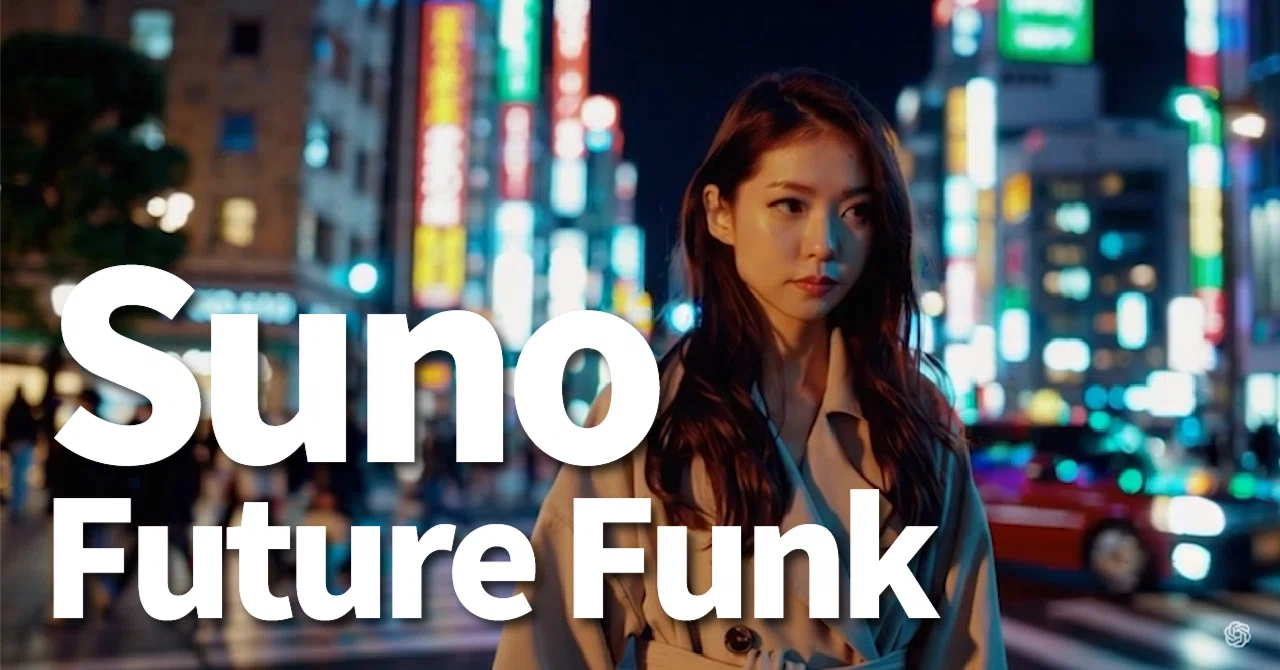
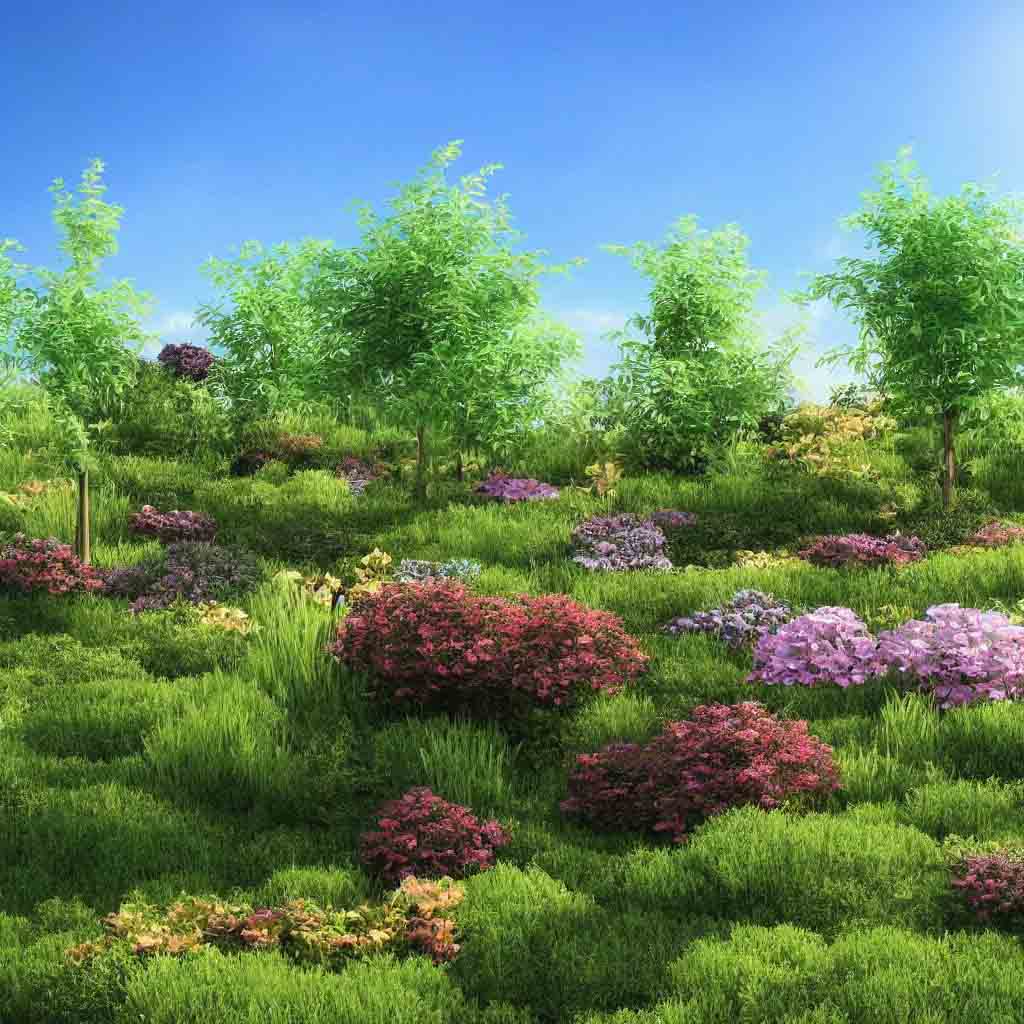
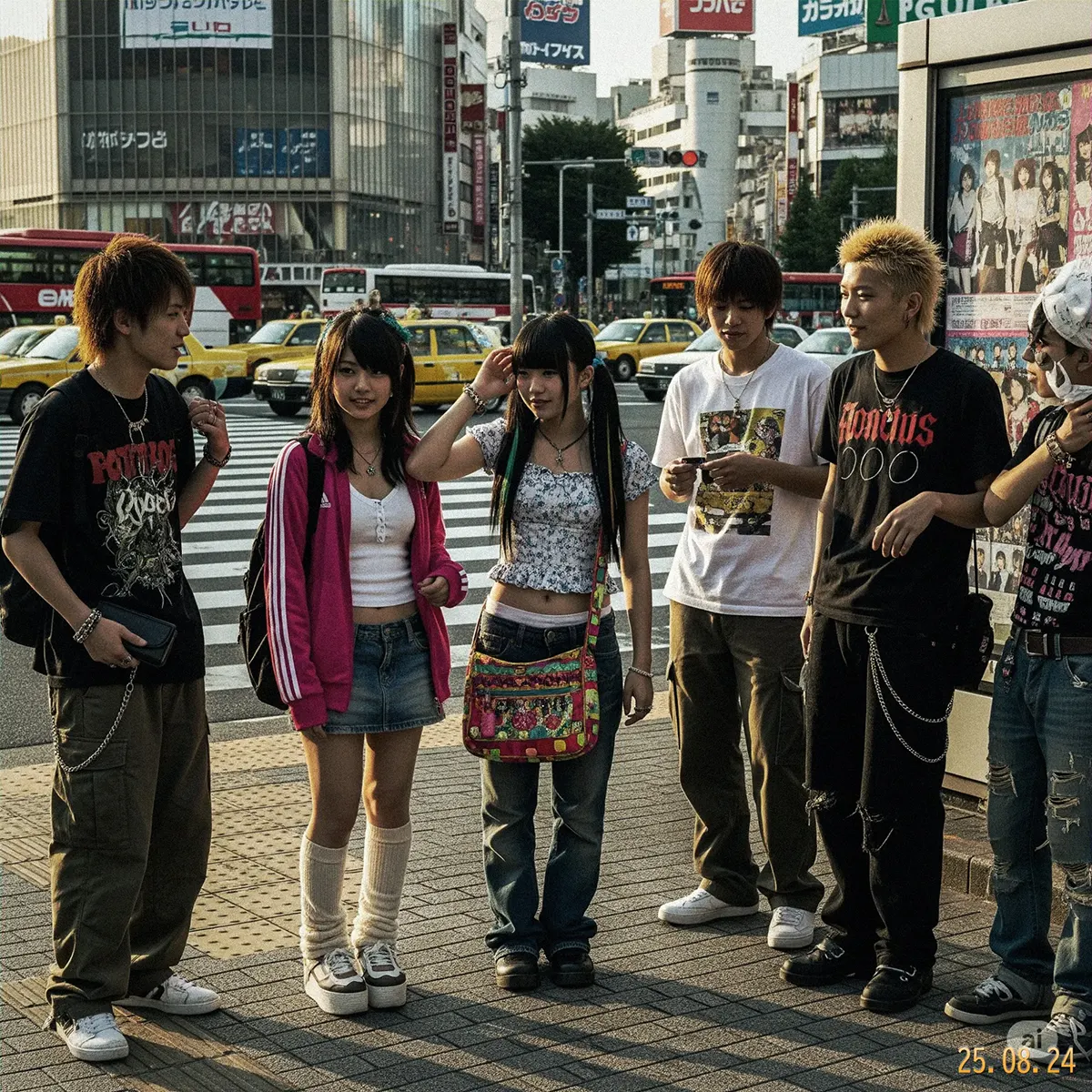
今回はこの画像を
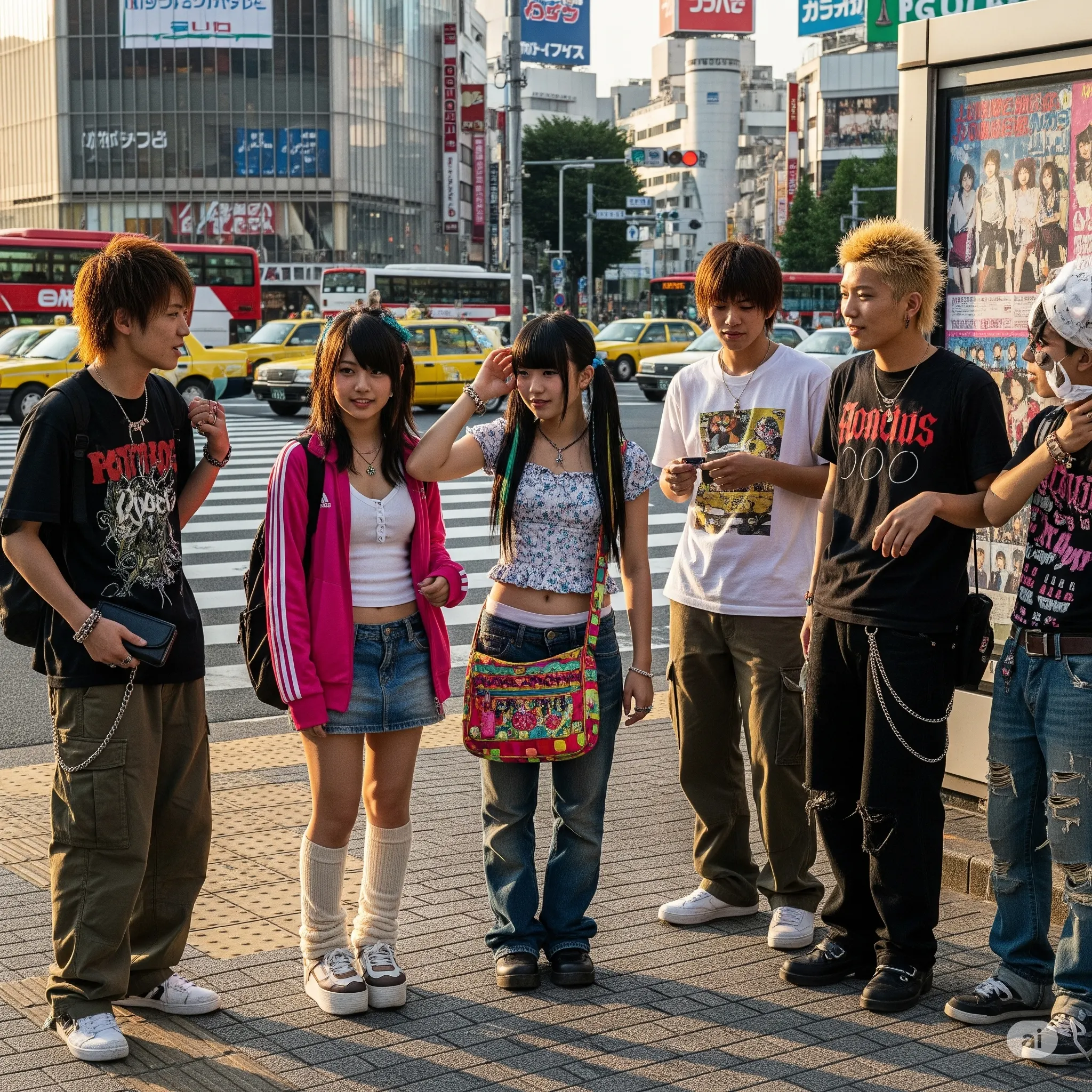
こういう感じにしました。
🛠️ 実装のポイント
- 彩度を抑えて黄ばみを追加 → プリント写真の退色感を再現
- 黒つぶれしない影 → 眠いシャドウで90年代のデジカメ感
- グリーンかぶり → 安価なスキャナっぽい雰囲気
- フィルム粒子 → 粗めのグレインをRGB分離で追加
- 日付スタンプ → 右下にオレンジ系フォントで配置
👨💻 技術ワンポイント解説
1. 彩度調整 (Saturation)
const satKeep = cfg.satBase - 0.3 * intensity;
const avgBlend = 1 - satKeep;
r = r * satKeep + avg * avgBlend;
g = g * satKeep + avg * avgBlend;
b = b * satKeep + avg * avgBlend;
👉 彩度を落として平均色に寄せることで「眠たい色味」を再現しています。
2. ハイライト/シャドウ別の色補正 (Split Toning)
const luma = 0.2126*r + 0.7152*g + 0.0722*b;
const shadow = Math.max(0, 1 - luma / 128);
const highlight = Math.max(0, (luma - 128) / 127);

r += cfg.highlight.r * highlight * intensity;
g += cfg.highlight.g * highlight * intensity;
b += cfg.highlight.b * highlight * intensity;
👉 明るい部分は黄色っぽく、暗い部分は緑や青を混ぜて「フィルム写真の雰囲気」を出しています。
3. フィルム粒子 (Film Grain)
const amp = 40 * filmGrain;
const n = 128 + (Math.random()*2 - 1) * amp;
gd[i] = gd[i+1] = gd[i+2] = n;
👉 ノイズを生成し、RGBに分離してズラすことで「ザラついたフィルム感」を演出。
4. 色収差 (Chromatic Aberration)
const idxR = (y*width + Math.min(width-1, x+1))*4;
const idxB = (y*width + Math.max(0, x-1))*4;
out[idx] = src[idxR];
out[idx+2] = src[idxB+2];
👉 赤を右、青を左に1pxずらすことで「安いレンズや古いスキャナのにじみ」を再現。
5. 日付スタンプ
ctx.font = `${fontSize}px monospace`;
ctx.fillStyle = gradText;
ctx.fillText(stamp, width - pad, height - pad);
👉 オレンジ〜黄色のグラデーション+ドロップシャドウで、まさに90年代デジカメ風の雰囲気を作り出しています。
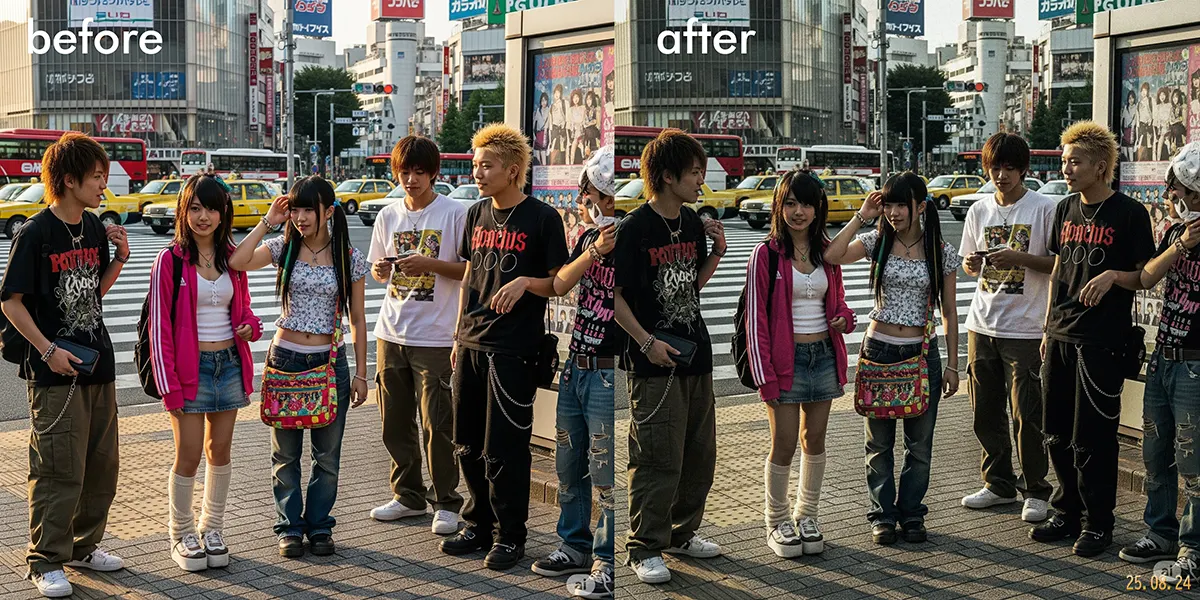
👀 実際のビフォー・アフター
- before: 現代的でシャープなAI生成写真
- after: 黄ばんだプリント感、眠い黒、粗い粒子、そして日付スタンプ!
渋谷の交差点を写した写真も、加工後は「2001年のセンター街スナップ」に見えてしまうほど。SNSにアップすれば「懐かしい!」「プリクラ感ある!」と盛り上がること間違いなしです。
💻 コード全文
以下が実装コードです。React (Next.js) + Canvas API で、完全にブラウザ内で処理しています。画像はサーバーへ送信されないため安心して利用できます。
// Photo90sEditor.tsx
"use client";

import { useCallback, useEffect, useRef, useState } from "react";
import { Upload, Download, SlidersHorizontal, Image as ImageIcon, Palette, CalendarDays } from "lucide-react";

type EffectOptions = {
  intensity: number; // 0..1 overall intensity
  noise: number; // 0..1 noise strength
};

type TonePresetKey = "blue" | "warm" | "green";
type TonePreset = {
  name: string;
  highlight: { r: number; g: number; b: number };
  shadow: { r: number; g: number; b: number };
  halation: string; // rgba
  satBase: number; // base saturation keep
  contrastGain: number; // contrast gain per intensity
  halationScale?: number; // amplify halation screen blend
  shadowLift?: number; // lift shadows amount baseline
};

const PRESETS: Record<TonePresetKey, TonePreset> = {
  warm: {
    name: "Warm 90s",
    highlight: { r: 14, g: 6, b: -4 },
    shadow: { r: -2, g: 6, b: 4 },
    halation: "rgba(255, 160, 80, 0.40)",
    satBase: 0.65,
    contrastGain: 0.06,
    halationScale: 1.35,
    shadowLift: 8,
  },
  green: {
    name: "Green 90s",
    highlight: { r: -2, g: 12, b: 4 },
    shadow: { r: -6, g: 8, b: 6 },
    halation: "rgba(80, 200, 140, 0.35)",
    satBase: 0.7,
    contrastGain: 0.1,
    halationScale: 1.0,
    shadowLift: 5,
  },
  blue: {
    name: "Blue 90s",
    highlight: { r: -2, g: 6, b: 14 },
    shadow: { r: -8, g: 2, b: 12 },
    halation: "rgba(60, 130, 255, 0.35)",
    satBase: 0.68,
    contrastGain: 0.12,
    halationScale: 1.0,
    shadowLift: 3,
  },
};

function formatYYMMDD(d = new Date()) {
  const yy = String(d.getFullYear() % 100).padStart(2, "0");
  const mm = String(d.getMonth() + 1).padStart(2, "0");
  const dd = String(d.getDate()).padStart(2, "0");
  return `${yy}.${mm}.${dd}`;
}

export default function Photo90sEditor() {
  const canvasRef = useRef<HTMLCanvasElement | null>(null);
  const [imageURL, setImageURL] = useState<string | null>(null);
  const [processing, setProcessing] = useState(false);
  const [options, setOptions] = useState<EffectOptions>({ intensity: 0.5, noise: 0.25 });
  const [isDragging, setIsDragging] = useState(false);
  const [preset, setPreset] = useState<TonePresetKey>("blue");
  const inputRef = useRef<HTMLInputElement | null>(null);
  const [showDate, setShowDate] = useState(true);
  const [greenBlend, setGreenBlend] = useState(0.2);
  const [filmGrain, setFilmGrain] = useState(0.35);

  useEffect(() => {
    return () => {
      if (imageURL) URL.revokeObjectURL(imageURL);
    };
  }, [imageURL]);

  const handleFile = useCallback((file: File) => {
    if (!file || !file.type.startsWith("image")) return;
    const url = URL.createObjectURL(file);
    setImageURL((prev) => {
      if (prev) URL.revokeObjectURL(prev);
      return url;
    });
  }, []);

  const onChangeFile = useCallback<React.ChangeEventHandler<HTMLInputElement>>(
    (e) => {
      const f = e.target.files?.[0];
      if (f) handleFile(f);
    },
    [handleFile]
  );

  const onDrop: React.DragEventHandler<HTMLDivElement> = (e) => {
    e.preventDefault();
    e.stopPropagation();
    setIsDragging(false);
    const f = e.dataTransfer.files?.[0];
    if (f) handleFile(f);
  };

  const onDragOver: React.DragEventHandler<HTMLDivElement> = (e) => {
    e.preventDefault();
    e.stopPropagation();
  };

  const onDragEnter: React.DragEventHandler<HTMLDivElement> = (e) => {
    e.preventDefault();
    e.stopPropagation();
    setIsDragging(true);
  };

  const onDragLeave: React.DragEventHandler<HTMLDivElement> = (e) => {
    e.preventDefault();
    e.stopPropagation();
    setIsDragging(false);
  };

  const apply90s = useCallback(async () => {
    if (!imageURL || !canvasRef.current) return;
    setProcessing(true);
    try {
      const img = await new Promise<HTMLImageElement>((resolve, reject) => {
        const i = new Image();
        i.onload = () => resolve(i);
        i.onerror = reject;
        i.src = imageURL;
      });

      const maxDim = 2000; // keep memory reasonable for export
      let { width, height } = img;
      const scale = Math.min(1, maxDim / Math.max(width, height));
      width = Math.round(width * scale);
      height = Math.round(height * scale);

      const canvas = canvasRef.current;
      const ctx = canvas.getContext("2d");
      if (!ctx) return;
      canvas.width = width;
      canvas.height = height;

      // Fill white if the image has transparency
      ctx.fillStyle = "#fff";
      ctx.fillRect(0, 0, width, height);

      ctx.drawImage(img, 0, 0, width, height);

      const imageData = ctx.getImageData(0, 0, width, height);
      const data = imageData.data;

      const intensity = Math.max(0, Math.min(1.5, options.intensity));
      const noiseAmt = Math.max(0, Math.min(1, options.noise));

      // Pixel process: lower saturation, split-toning, mild contrast, noise
      const cfg = PRESETS[preset];
      const satKeep = cfg.satBase - 0.3 * intensity; // base → lower when intensity increases
      const avgBlend = 1 - satKeep; // to pull toward grayscale

      // Contrast factor (simple curve)
      const contrast = 1 + cfg.contrastGain * Math.min(1, intensity); // preset-based gain
      const offset = 128 * (1 - contrast);

      // Subtle S-curve helper
      const sCurve = (v: number) => {
        const t = (v - 128) / 128;
        const curved = t + 0.25 * intensity * (t - t * t * t); // gentle S-curve
        return curved * 128 + 128;
      };

      for (let i = 0; i < data.length; i += 4) {
        let r = data[i];
        let g = data[i + 1];
        let b = data[i + 2];

        const avg = (r + g + b) / 3;
        r = r * satKeep + avg * avgBlend;
        g = g * satKeep + avg * avgBlend;
        b = b * satKeep + avg * avgBlend;

        // Split toning based on preset
        const luma = 0.2126 * r + 0.7152 * g + 0.0722 * b;
        const shadow = Math.max(0, 1 - luma / 128); // 0..1
        const highlight = Math.max(0, (luma - 128) / 127); // 0..1
        r += cfg.highlight.r * highlight * intensity;
        g += cfg.highlight.g * highlight * intensity;
        b += cfg.highlight.b * highlight * intensity;
        r += cfg.shadow.r * shadow * intensity;
        g += cfg.shadow.g * shadow * intensity;
        b += cfg.shadow.b * shadow * intensity;

        // Optional green cast blend (cheap scanner vibe)
        if (greenBlend > 0) {
          const gb = Math.min(1, Math.max(0, greenBlend));
          const gcfg = PRESETS.green;
          r += (gcfg.highlight.r * highlight + gcfg.shadow.r * shadow) * intensity * gb * 0.7;
          g += (gcfg.highlight.g * highlight + gcfg.shadow.g * shadow) * intensity * gb * 0.7;
          b += (gcfg.highlight.b * highlight + gcfg.shadow.b * shadow) * intensity * gb * 0.7;
        }

        // mild contrast
        r = r * contrast + offset;
        g = g * contrast + offset;
        b = b * contrast + offset;

        // gentle S-curve on each channel
        r = sCurve(r);
        g = sCurve(g);
        b = sCurve(b);

        // lift shadows (make blacks softer)
        const lift = (cfg.shadowLift ?? 4) * Math.min(1.2, intensity);
        const shadowW = shadow;
        r += lift * shadowW;
        g += lift * shadowW;
        b += lift * shadowW;

        // noise per channel
        const n = (Math.random() * 2 - 1) * 40 * noiseAmt; // +/- up to ~40
        r += n;
        g += n * 0.9;
        b += n * 1.1;

        data[i] = r < 0 ? 0 : r > 255 ? 255 : r;
        data[i + 1] = g < 0 ? 0 : g > 255 ? 255 : g;
        data[i + 2] = b < 0 ? 0 : b > 255 ? 255 : b;
      }

      ctx.putImageData(imageData, 0, 0);

      // Subtle chromatic aberration (shift R right, B left by 1px)
      if (intensity > 0.2) {
        const srcData = ctx.getImageData(0, 0, width, height);
        const src = srcData.data;
        const out = new Uint8ClampedArray(src); // copy
        const shift = 1; // px
        for (let y = 0; y < height; y++) {
          for (let x = 0; x < width; x++) {
            const idx = (y * width + x) * 4;
            const idxR = (y * width + Math.min(width - 1, x + shift)) * 4;
            const idxB = (y * width + Math.max(0, x - shift)) * 4;
            out[idx] = src[idxR]; // R
            // G stays
            out[idx + 2] = src[idxB + 2]; // B
          }
        }
        ctx.putImageData(new ImageData(out, width, height), 0, 0);
      }

      // Vignette overlay (multiply)
      const grad = ctx.createRadialGradient(
        width / 2,
        height / 2,
        Math.min(width, height) * 0.2,
        width / 2,
        height / 2,
        Math.max(width, height) * 0.75
      );
      grad.addColorStop(0, "rgba(0,0,0,0)");
      grad.addColorStop(1, `rgba(0,0,0,${0.35 * intensity})`);
      ctx.save();
      ctx.globalCompositeOperation = "multiply";
      ctx.fillStyle = grad;
      ctx.fillRect(0, 0, width, height);
      ctx.restore();

      // Subtle scanline effect (every few rows slightly dark)
      if (intensity > 0.4) {
        ctx.save();
        ctx.globalAlpha = 0.06 * (intensity - 0.4);
        ctx.fillStyle = "#000";
        for (let y = 0; y < height; y += 3) {
          ctx.fillRect(0, y, width, 1);
        }
        ctx.restore();
      }

      // Film grain overlay with RGB split
      if (filmGrain > 0.01) {
        const g = document.createElement("canvas");
        g.width = width;
        g.height = height;
        const gctx = g.getContext("2d");
        if (gctx) {
          const gImg = gctx.createImageData(width, height);
          const gd = gImg.data;
          const amp = 40 * filmGrain; // amplitude of grain
          for (let i = 0; i < gd.length; i += 4) {
            const n = 128 + (Math.random() * 2 - 1) * amp; // base gray
            gd[i] = gd[i + 1] = gd[i + 2] = n;
            gd[i + 3] = 255;
          }
          gctx.putImageData(gImg, 0, 0);

          const tint = (color: string, dx: number, dy: number, alpha: number) => {
            const t = document.createElement("canvas");
            t.width = width;
            t.height = height;
            const tctx = t.getContext("2d");
            if (!tctx) return;
            tctx.drawImage(g, 0, 0);
            tctx.globalCompositeOperation = "source-in";
            tctx.fillStyle = color;
            tctx.fillRect(0, 0, width, height);
            ctx.save();
            ctx.globalCompositeOperation = "overlay" as GlobalCompositeOperation;
            ctx.globalAlpha = alpha;
            ctx.drawImage(t, dx, dy);
            ctx.restore();
          };

          const baseAlpha = 0.18 + 0.18 * Math.min(1, intensity);
          tint("rgba(255,0,0,1)", 1, 0, baseAlpha * 0.9);
          tint("rgba(0,255,0,1)", -1, 0, baseAlpha);
          tint("rgba(0,0,255,1)", 0, 1, baseAlpha * 0.85);
        }
      }

      // Bloom/Halation: blur + preset tint, then screen blend
      if (intensity > 0.2) {
        const tmp = document.createElement("canvas");
        tmp.width = width;
        tmp.height = height;
        const tctx = tmp.getContext("2d");
        if (tctx) {
          tctx.filter = `blur(${Math.round(6 + 10 * intensity)}px)`;
          tctx.drawImage(canvas, 0, 0);
          tctx.filter = "none";
          tctx.globalCompositeOperation = "multiply";
          tctx.fillStyle = cfg.halation;
          tctx.fillRect(0, 0, width, height);

          ctx.save();
          ctx.globalCompositeOperation = "screen";
          const hscale = cfg.halationScale ?? 1.0;
          ctx.globalAlpha = (0.14 + 0.12 * intensity) * hscale;
          ctx.drawImage(tmp, 0, 0);
          ctx.restore();

          // Extra green halation blend if requested
          if (greenBlend > 0.01) {
            tctx.globalCompositeOperation = "multiply";
            tctx.fillStyle = PRESETS.green.halation;
            tctx.fillRect(0, 0, width, height);
            ctx.save();
            ctx.globalCompositeOperation = "screen";
            ctx.globalAlpha = (0.08 + 0.08 * intensity) * Math.min(1, greenBlend);
            ctx.drawImage(tmp, 0, 0);
            ctx.restore();
          }
        }
      }

      // Date stamp (bottom-right) with slight gloss
      if (showDate) {
        const stamp = formatYYMMDD();
        ctx.save();
        const pad = Math.max(8, Math.round(Math.min(width, height) * 0.015));
        const fontSize = Math.max(10, Math.round(Math.min(width, height) * 0.028));
        ctx.font = `${fontSize}px monospace`;
        ctx.textBaseline = "bottom";
        ctx.textAlign = "right";

        // Glow highlight
        ctx.save();
        ctx.globalCompositeOperation = "screen";
        ctx.filter = `blur(${Math.max(0.6, 1.0 * intensity)}px)`;
        ctx.globalAlpha = 0.35;
        ctx.fillStyle = "#ffffff";
        ctx.fillText(stamp, width - pad, height - pad - Math.round(fontSize * 0.08));
        ctx.restore();

        // Gradient fill for glossy feel
        const gradText = ctx.createLinearGradient(0, height - pad - fontSize, 0, height - pad);
        gradText.addColorStop(0, "#ffd8a6");
        gradText.addColorStop(0.5, "#ffb347");
        gradText.addColorStop(1, "#ff9f1a");
        ctx.fillStyle = gradText;

        // Shadow for readability
        ctx.shadowColor = "rgba(0,0,0,0.55)";
        ctx.shadowBlur = 0;
        ctx.shadowOffsetX = 1;
        ctx.shadowOffsetY = 1;
        ctx.fillText(stamp, width - pad, height - pad);
        ctx.restore();
      }
    } finally {
      setProcessing(false);
    }
  }, [imageURL, options.intensity, options.noise, preset, showDate, greenBlend, filmGrain]);

  useEffect(() => {
    if (imageURL) apply90s();
  }, [imageURL, apply90s]);

  // Auto-apply on option/preset changes (debounced)
  useEffect(() => {
    if (!imageURL) return;
    const id = setTimeout(() => apply90s(), 180);
    return () => clearTimeout(id);
  }, [options, preset, imageURL, showDate, greenBlend, filmGrain, apply90s]);

  const onDownload = useCallback(() => {
    const canvas = canvasRef.current;
    if (!canvas) return;
    const url = canvas.toDataURL("image/jpeg", 0.92);
    const a = document.createElement("a");
    a.href = url;
    a.download = `photo90s_${Date.now()}.jpg`;
    a.click();
  }, []);

  return (
    <>
      <section className="modern-card p-4 sm:p-6">
        <div className="flex flex-col gap-4">
          <div className="flex flex-col md:flex-row md:items-center gap-3">
            <div className="flex flex-wrap items-center gap-3">
            <label className="modern-button cursor-pointer inline-flex items-center gap-2 w-full sm:w-auto justify-center">
                <Upload className="h-4 w-4" />
                画像を選択
                <input
                  type="file"
                  accept="image/*"
                  className="hidden"
                  onChange={onChangeFile}
                  ref={inputRef}
                />
              </label>
              <button
                className="modern-button inline-flex items-center gap-2 disabled:opacity-60 w-full sm:w-auto justify-center"
                onClick={onDownload}
                disabled={!imageURL || processing}
              >
                <Download className="h-4 w-4" />
                ダウンロード
              </button>
            </div>

            <div className="md:ml-auto">
              <div className="flex flex-col md:flex-row md:flex-wrap md:items-center gap-3 md:gap-4 text-sm text-muted-foreground">
                <div className="flex items-center gap-2 min-w-0">
                  <Palette className="h-4 w-4" />
                  <div className="inline-flex rounded-md overflow-hidden border border-muted-foreground/20 max-w-full overflow-x-auto whitespace-nowrap">
                    {(["blue","warm","green"] as TonePresetKey[]).map((k) => (
                      <button
                        key={k}
                        onClick={() => setPreset(k)}
                        className={`px-3 py-1.5 text-xs ${preset === k ? "bg-primary text-white" : "bg-background hover:bg-muted"}`}
                        aria-pressed={preset === k}
                      >
                        {PRESETS[k].name}
                      </button>
                    ))}
                  </div>
                </div>
                <div className="flex items-center gap-2 min-w-[220px]">
                  <SlidersHorizontal className="h-4 w-4" />
                  <span className="whitespace-nowrap">効果</span>
                  <input
                    aria-label="効果の強さ"
                    type="range"
                    min={0}
                    max={1.5}
                    step={0.01}
                    value={options.intensity}
                    onChange={(e) => setOptions((o) => ({ ...o, intensity: Number(e.target.value) }))}
                    className="w-32"
                  />
                  <span className="tabular-nums w-12 text-right">{Math.round(options.intensity * 100)}%</span>
                </div>
                <div className="flex items-center gap-2 min-w-[220px]">
                  <ImageIcon className="h-4 w-4" />
                  <span className="whitespace-nowrap">ノイズ</span>
                  <input
                    aria-label="ノイズの強さ"
                    type="range"
                    min={0}
                    max={1}
                    step={0.01}
                    value={options.noise}
                    onChange={(e) => setOptions((o) => ({ ...o, noise: Number(e.target.value) }))}
                    className="w-32"
                  />
                  <span className="tabular-nums w-10 text-right">{Math.round(options.noise * 100)}%</span>
                </div>
                <div className="flex items-center gap-2 min-w-[200px]">
                  <span className="whitespace-nowrap">緑かぶり</span>
                  <input
                    aria-label="緑かぶり"
                    type="range"
                    min={0}
                    max={1}
                    step={0.01}
                    value={greenBlend}
                    onChange={(e) => setGreenBlend(Number(e.target.value))}
                    className="w-32"
                  />
                  <span className="tabular-nums w-10 text-right">{Math.round(greenBlend * 100)}%</span>
                </div>
                <div className="flex items-center gap-2 min-w-[220px]">
                  <span className="whitespace-nowrap">粒子</span>
                  <input
                    aria-label="フィルム粒子"
                    type="range"
                    min={0}
                    max={1}
                    step={0.01}
                    value={filmGrain}
                    onChange={(e) => setFilmGrain(Number(e.target.value))}
                    className="w-32"
                  />
                  <span className="tabular-nums w-10 text-right">{Math.round(filmGrain * 100)}%</span>
                </div>
                <div className="flex items-center gap-2">
                  <CalendarDays className="h-4 w-4" />
                  <label className="inline-flex items-center gap-2 cursor-pointer select-none">
                    <input
                      type="checkbox"
                      className="accent-primary"
                      checked={showDate}
                      onChange={(e) => setShowDate(e.target.checked)}
                    />
                    <span>日付スタンプ</span>
                  </label>
                </div>
              </div>
            </div>
          </div>

          {/* Drop area / Preview */}
          {!imageURL ? (
            <div
              onDrop={onDrop}
              onDragOver={onDragOver}
              onDragEnter={onDragEnter}
              onDragLeave={onDragLeave}
              onClick={() => inputRef.current?.click()}
              className={`h-64 grid place-items-center rounded-lg border-2 border-dashed transition-colors ${
                isDragging ? "border-primary/60 bg-primary/5" : "border-muted-foreground/30"
              }`}
              role="button"
              aria-label="ここに画像をドラッグ&ドロップ、またはクリックして選択"
              tabIndex={0}
            >
              <div className="flex flex-col items-center gap-2 text-muted-foreground text-sm">
                <ImageIcon className="h-8 w-8" />
                <p className="text-center leading-relaxed">ここをクリックしてアップロード<br className="hidden sm:block" />またはドラッグ&ドロップ</p>
              </div>
            </div>
          ) : (
            <div className="w-full overflow-auto rounded-lg bg-background">
              <canvas ref={canvasRef} className="max-w-full h-auto block mx-auto" />
            </div>
          )}
        </div>
      </section>

      <section className="text-xs text-muted-foreground">
        <ul className="list-disc pl-5 space-y-1">
          <li>処理はすべてブラウザ内で完結し、画像はサーバーへ送信されません。</li>
          <li>大きな画像はメモリ節約のため最大2000pxにリサイズして処理します。</li>
          <li>保存形式はJPEGです。透明部分がある場合は白で塗りつぶされます。</li>
        </ul>
      </section>
    </>
  );
}
🚀 まとめ
- 「写ルンです」や「初期デジカメ」風の質感をブラウザだけで再現可能
- AI生成画像 × レトロ加工 でSNSバズを狙える
- 技術的には Canvas API のピクセル操作で完結
レトロブームとAI画像の掛け算で、次のトレンドは「平成レトロ風AIフォト」かもしれません。気になった方はぜひコードを参考に、あなたの写真やAI画像を90年代風に加工してみてください!